
Emoji Battery & Shimeji Pets
ZAppsolutionProductivity
4.6140.00 Reviews
- Version
- 1.0.7
- Installs
- 1.00M
- Age Rating
- Everyone
Screenshots

Our Review of Emoji Battery & Shimeji Pets
 Analysis by Appyee
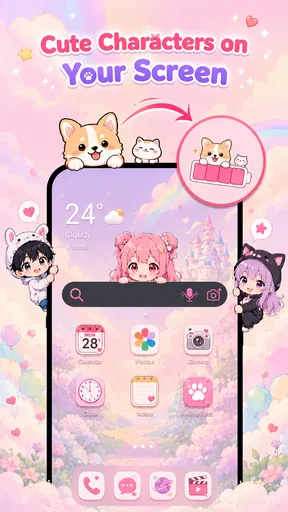
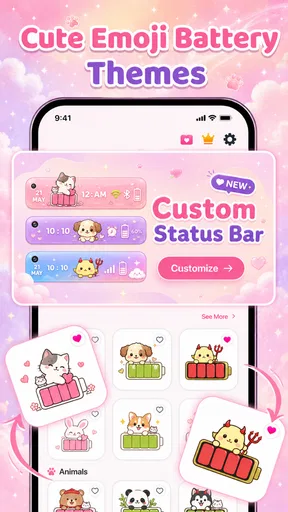
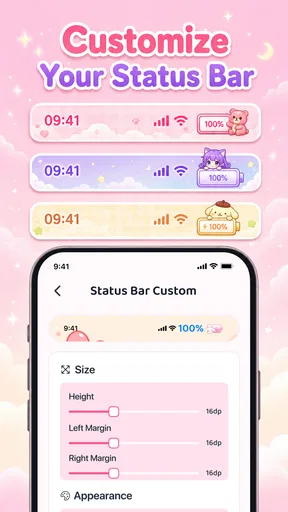
I approached Emoji Battery & Shimeji Pets as a small personalization and productivity app rather than a serious battery-management tool. Its appeal is easy to understand: it places a playful emoji-style battery indicator on the phone and adds cute Shimeji pets that can live around the screen. That combination gives an otherwise ordinary status area a bit more personality, while still keeping battery information close at hand.
After using it, my view is that the app works best for people who enjoy visual customization and want a lighthearted phone interface. It is not the kind of utility I would install to improve battery life, diagnose charging problems, or replace Android’s own battery settings. The useful question is whether the extra character and customization are worth adding another layer to something the operating system already handles.
It comes from ZAppsolution and sits in the productivity category, although its real value is closer to personalization. The app is free to install, with optional in-app purchases ranging from $3.99 to $9.99 per item. It is suitable for Everyone, runs on Android 8.0 and later, and the current version is 1.0.1. Those details make it accessible to a broad range of Android users, including people with older phones who still want a more expressive interface.
What the app actually adds to everyday phone use
The central idea is simple: instead of treating the battery indicator as a purely functional symbol, the app turns it into part of the phone’s visual identity. The emoji battery icon can make the remaining charge easier to notice at a glance, while the Shimeji pets add movement and companionship to the screen. I found that this changes the mood of the interface more than it changes the way I manage power.
A realistic use case is checking the phone during a busy morning. I might be moving between messages, a calendar reminder and navigation, with only a moment to see whether I need to charge. A distinctive battery design can be more noticeable than a familiar system icon. The pet element is less practical, but it makes the screen feel personal rather than anonymous.
That distinction matters. The app does not become a battery saver simply because it displays battery status in a cute format. If your main concern is extending endurance, Android’s built-in battery settings, adaptive battery tools and power-saving mode remain the more appropriate choices. I would use this app alongside those tools, not instead of them.
The strongest part of the concept is the balance between a small utility and decoration. Many customization apps focus entirely on wallpapers, icon packs or widgets. Here, the battery indicator gives the customization a job to do. It is still decorative, but it is tied to information I check repeatedly throughout the day.
Personalization is the reason to install it
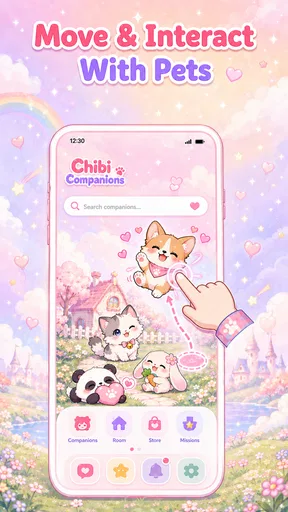
The Shimeji pets are likely to be the deciding feature for most users. They create a more animated screen and can make a device feel less formal. I can see the appeal for someone who enjoys character themes, emoji interfaces or changing the look of a phone according to mood. The app also makes sense for a secondary device used by a child or family member, provided the person responsible for the device is comfortable with the visual overlays and purchase options.
There is a trade-off, though. A pet on the screen is charming when it feels occasional and unobtrusive; it becomes distracting when it competes with reading, typing or navigation. I would keep the design restrained on a work phone and use the more expressive options on a personal device. That is a practical way to enjoy the feature without allowing the decoration to dominate every interaction.
Another useful approach is to treat the battery icon as a visual cue rather than a replacement for exact information. When I need a quick impression, the customized indicator is convenient. When I am deciding whether a long trip or video call is realistic, I would still open the standard battery panel and check the percentage and usage details there.
How it compares with ordinary alternatives
The usual alternative is simply the Android status bar. It is less playful, but it is already integrated into the system, familiar and designed to remain available without extra customization. For a user who wants maximum clarity and minimum distraction, the default option is better.
Battery widgets are another alternative. They can offer more room for information and may be preferable if you want a larger percentage, charging state or additional device details in one place. Their weakness is that they occupy screen space. Emoji Battery & Shimeji Pets takes a more compact, personality-focused approach, assuming that visual charm matters more than a dense dashboard.
Full launcher themes and icon packs offer deeper changes than this app, but they also require more setup and can alter the entire home-screen experience. This app is more approachable when I want one noticeable change without redesigning every icon. On the other hand, someone seeking a consistent theme across the launcher, lock screen and widgets will probably find a dedicated launcher or theme tool more complete.
That places the app in a clear middle ground. It is more distinctive than the default battery display, less comprehensive than a full customization suite, and more playful than a conventional battery widget. Its success depends on whether that narrow focus matches what you want.
Trust starts with visible choices
For a personalization app, I pay attention to how much control I have before I commit to using it regularly. The important questions are practical: can I choose whether the pet appears, can I change the visual style, can I return to the normal status-bar experience, and can I avoid optional purchases if I do not want them?
The app’s appeal is strongest when customization feels voluntary. I do not want a decorative character to become an unavoidable part of every screen, and I do not want a free download to push me toward spending before I understand what the basic version does. With optional purchases priced from $3.99 to $9.99 per item, I would take a moment to inspect the available choices and confirm which elements are included before buying anything.
I also recommend treating the first setup as a review of the app’s visible controls. Look for settings that affect the battery icon, the pet display and any appearance changes. If a particular option is not useful, disabling it is better than tolerating it simply because it was enabled during setup. This is a small habit, but it keeps the phone aligned with how you actually use it.
Because the app is free, the sensible starting point is to use the no-cost experience for several days. That gives you time to decide whether the pet remains enjoyable or becomes background clutter. It also helps separate a feature you genuinely use from one that only looks attractive in a first impression.
Data-sensitive moments deserve attention
My trust assessment here has to stay grounded in what is visibly presented while using the app. A cute interface can make an application feel harmless, but appearance is not evidence about permissions, data handling or account behavior. I would read the permission prompts and privacy information shown during installation and setup rather than assuming that a personalization tool needs broad access.
The most important moment is when the app asks for access that affects how it appears over other content or changes the status-bar experience. That kind of access can be central to the app’s design, but it should still be understandable to the person granting it. I would only approve a request when the purpose is clear and matches the feature I intend to use.
I would also pay attention to purchase screens. Optional items can be useful for expanding the visual choices, but the price should be visible before confirmation, and I would check whether the purchase is for one item or a broader collection. Since the app is free with paid items, this is where user attention matters most: the free installation does not mean every customization option is included.
For a shared phone, I would be especially careful. A child or another family member may enjoy the pets but may not understand purchase prompts or access requests. The Everyone content rating describes the intended age suitability of the content, not a substitute for supervision around device permissions or payments. I would set up the app myself and explain which controls are available.
There is also a privacy-conscious reason to keep the setup minimal. If I only want the emoji battery icon, I would avoid enabling unrelated visual elements. Using the smallest set of features that solves the problem reduces clutter and makes it easier to understand what the app is doing on the device.
Small workflows that make the experience better
One workflow I found sensible is to start with the battery icon alone. This establishes whether the visual change is genuinely easier to read than the system indicator. Only after that would I add a Shimeji pet. Testing the two parts separately makes it easier to identify what I enjoy and what I find distracting.
A second workflow is to match the pet’s presence to the context of the phone. On a personal home screen, the animation can be fun. During work, study or navigation, a simpler setup may be more comfortable. If the app provides the relevant controls in its settings, using them selectively is better than uninstalling the whole app because one element became annoying.
A third tip is to avoid judging the app during the first few minutes. Novelty can make any animated customization seem more useful than it is. I would use the phone normally for a day or two, including charging, messaging and reading, then ask whether I noticed the battery state more easily or merely spent time watching the decoration. That test gives a more honest answer than the initial excitement.
For people who frequently change themes, I would also keep a simple record of the configuration that works. A restrained battery style, one favorite pet and limited visual movement may be more enjoyable than constantly switching between options. The app is at its best when it adds a recognizable signature to the phone rather than turning the screen into a collection of competing effects.
Performance expectations and practical limitations
I would not install this expecting detailed battery analytics, charging optimization or technical diagnostics. The app’s role is presentation and personalization. If your phone has a battery-health problem, unexpected background drain or charging fault, the operating system and manufacturer tools are the proper places to investigate.
Any screen decoration also introduces a potential attention cost. Even when an animated pet is small, movement can pull the eye away from a message or task. This is not a flaw for every user, but it is a real limitation for people who prefer calm interfaces. If you already find live wallpapers, floating widgets or notification badges distracting, the Shimeji feature may not suit your habits.
Older Android devices may also be a consideration. The minimum requirement of Android 8.0 makes the app broadly compatible, but compatibility does not guarantee that every phone will feel equally comfortable with additional visual elements. I would monitor responsiveness and battery behavior during normal use rather than assuming that a supported device will deliver the same experience as a newer model.
The current version, 1.0.1, suggests that I would approach the app as a focused, still-developing utility rather than a mature customization platform. That is not automatically negative, but it makes it sensible to keep expectations narrow. I would value reliable controls and a clean setup more than a huge catalog of effects.
Who will enjoy it, and who should skip it
I would recommend it to Android users who like emoji styling, character companions and small changes that make a phone feel more personal. It is particularly suitable for someone who checks battery status often but finds the default icon visually dull. The free entry point also makes it easy to try before deciding whether optional purchases are worthwhile.
I would be more cautious about recommending it to someone who wants a professional, distraction-free interface. If you use your phone mainly for work, navigation, reading or accessibility-focused clarity, the default status bar may be the better choice. A conventional battery widget may also be preferable if exact information is more important to you than character design.
It is not the right pick for a person searching for power-saving technology. The app can make battery information more expressive, but it should not be confused with a tool that extends battery life. Likewise, users who want a complete launcher makeover will probably get more value from a dedicated theme or launcher that changes icons, layouts and widgets together.
For families, I would recommend adult setup and clear purchase boundaries. The Everyone rating makes the content broadly approachable, but the presence of optional paid items means the person managing the device should review the purchasing flow before handing the phone to a child.
My cautious verdict
My overall impression is positive, but deliberately limited. Emoji Battery & Shimeji Pets succeeds because it gives a familiar piece of phone information a more personal presentation. The emoji battery icon has a practical visual role, while the Shimeji pets provide the emotional appeal. Together, they make sense for users who want a friendly interface rather than a purely functional one.
The app earns its place when the customization remains under your control. I would begin with the free version, inspect every visible choice, approve only permissions that clearly match the feature I want, and test the battery icon before adding animated pets. I would also keep Android’s own battery tools available for anything more serious than a quick glance.
With a 4.6 average from around 7,300 ratings and over 100,000 installs, it has already attracted a meaningful audience, but those figures are not a substitute for checking whether its style fits your phone. My recommendation is straightforward: try it if you want a cute, compact visual change and are comfortable reviewing setup choices. Skip it if you need technical battery management, a completely quiet screen or a full system-wide theme.
In short, this is a personality upgrade for the battery area, not a battery-performance solution. Used with modest settings and sensible attention to permissions and purchases, it can make everyday phone checks more enjoyable without demanding a complete redesign.
Privacy and Permissions
See what permissions an app requests and how it handles your data.
- Photos/Media/Files
- read the contents of your USB storage, modify or delete the contents of your USB storage
- Storage
- read the contents of your USB storage, modify or delete the contents of your USB storage
- Wi-Fi connection information
- view Wi-Fi connections
- Other
- view network connections, full network access, run at startup, reorder running apps, draw over other apps, control vibration, prevent device from sleeping, Google Play license check
Verdict
Strengths of Emoji Battery & Shimeji Pets
- Cute animated pets make checking battery levels more enjoyable.
- Battery information is visible at a glance through the home-screen widget.
- Offers a playful alternative to standard static battery widgets.
- Shimeji characters add personality without requiring constant interaction.
- Simple setup makes it accessible for casual users.
Limitations of Emoji Battery & Shimeji Pets
- Animated characters may consume extra battery on some devices.
- The app can feel distracting if you prefer a clean, minimal screen.
- Some pets, themes, or features may require in-app purchases.
- Widget compatibility and appearance can vary between Android launchers.
- Privacy and permission details should be checked before enabling extra features.
Other Releases by ZAppsolution
View All
Baby & Pregnancy Tracker App
Parenting4.2

3D 4D 4K Live Wallpaper
Personalization4.3
Similar Picks in This Category
View All
Google Calendar
Google LLC4.6

Google Drive
Google LLC4.3

Google Assistant
Google LLC3.9

Microsoft OneDrive
Microsoft Corporation4.6

Samsung Calendar
Samsung Electronics Co., Ltd.4.1

Microsoft OneNote: Save Notes
Microsoft Corporation4.6
Frequently Asked Questions
What is Emoji Battery & Shimeji Pets?
Emoji Battery & Shimeji Pets is a customization app that combines battery information with animated emoji-style characters and desktop or screen companions. Depending on the selected design, it can display your current battery level while letting a small virtual pet or Shimeji character appear on your device. It is mainly intended for users who enjoy playful personalization rather than advanced battery-management tools.
How does the battery display work?
The app generally presents your device’s battery percentage through a themed widget, screen element, or animated character. After installation, you may need to grant permission for widgets, notifications, or display overlays, depending on the platform and chosen feature. Battery readings should be treated as a visual convenience, because the phone’s built-in battery indicator remains the most reliable source for exact status information.
What are Shimeji pets, and can I customize them?
Shimeji pets are small animated characters that move around the screen and react to taps or interaction. Emoji Battery & Shimeji Pets may offer different characters, expressions, themes, and animation styles, although the available selection can vary by device, app version, or premium access. Before downloading, check the current in-app catalog to confirm whether your preferred pet or emoji design is included.
Does the app affect battery life or phone performance?
Because animated pets and battery widgets may remain active in the background, the app can use some battery, memory, and processing power. The impact is usually modest on newer devices, but it may be more noticeable when several animations, overlays, or frequent updates are enabled. If your phone becomes warm, slows down, or loses charge quickly, reduce animation activity or disable background features.
Is Emoji Battery & Shimeji Pets free to use?
The app may be available as a free download while offering optional advertisements, in-app purchases, premium characters, or additional customization features. The exact pricing and restrictions can change with updates, so review the store listing and purchase screen before confirming anything. Also check the permissions requested, especially overlay, notification, and background-access permissions, to ensure they match your comfort level.
